
Opening a Google Play developer account
Creating a Play Console account, the registration fee, the 14-day testing requirement for personal accounts and adding us to the account.
Which account type?
| Business type | Play Console account |
|---|---|
| Company | Organization account. Requires a D-U-N-S Number; the one you got for Apple works here too. |
| Individual or sole proprietor | Personal account. Has a 14-day testing requirement before publishing (below). |
Open the account
Go to the sign-up page
Sign in at play.google.com/console/signup with a Google account. That account becomes the Play Console owner; we recommend a shared company account rather than a personal Gmail.
Choose the account type and enter details
- Organization: D-U-N-S Number, legal name and address, company phone, website and contact details. Phone and email are verified with one-time codes.
- Personal: your name and address come from your Google payments profile. Identity verification may be requested. Before publishing, you need to verify your phone with the Play Console mobile app.
Pay the registration fee
25 USD, paid once, no yearly renewal. Prepaid cards are not accepted. Payment verification can take up to 5 days.
Add us to your account
In Play Console, open Users and permissions and click Invite new users.
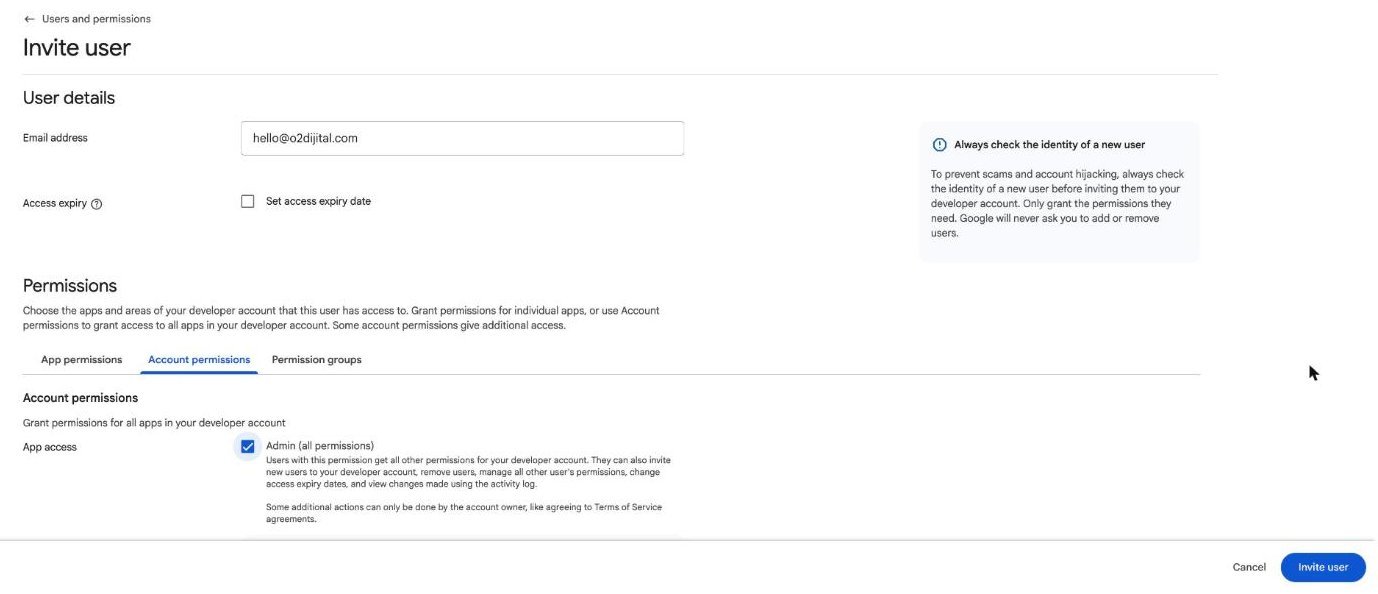
| Field | What to do |
|---|---|
| Email address | hello@o2dijital.com |
| Account permissions | Admin (all permissions) checked |
Click Invite user at the bottom right. The invitation is valid for 30 days. You always remain the account owner and can remove our access at any time.
14-day testing for personal accounts
For newly created personal accounts, Google requires the app to go through a closed test before publishing: at least 12 people must keep the app installed on their Android phone for 14 days in a row. This is Google's requirement, and you need to find the 12 testers: employees, family or customers all work.
Once you have them, send us their Gmail addresses and we will send the test invitations. Google does not allow a production release before the 14 days are up, so we recommend starting the list the day you open the account.